
Hide unwanted jobs and companies from LinkedIn search results. Track applied jobs. Filter by country and date. Everything stays local in your browser.



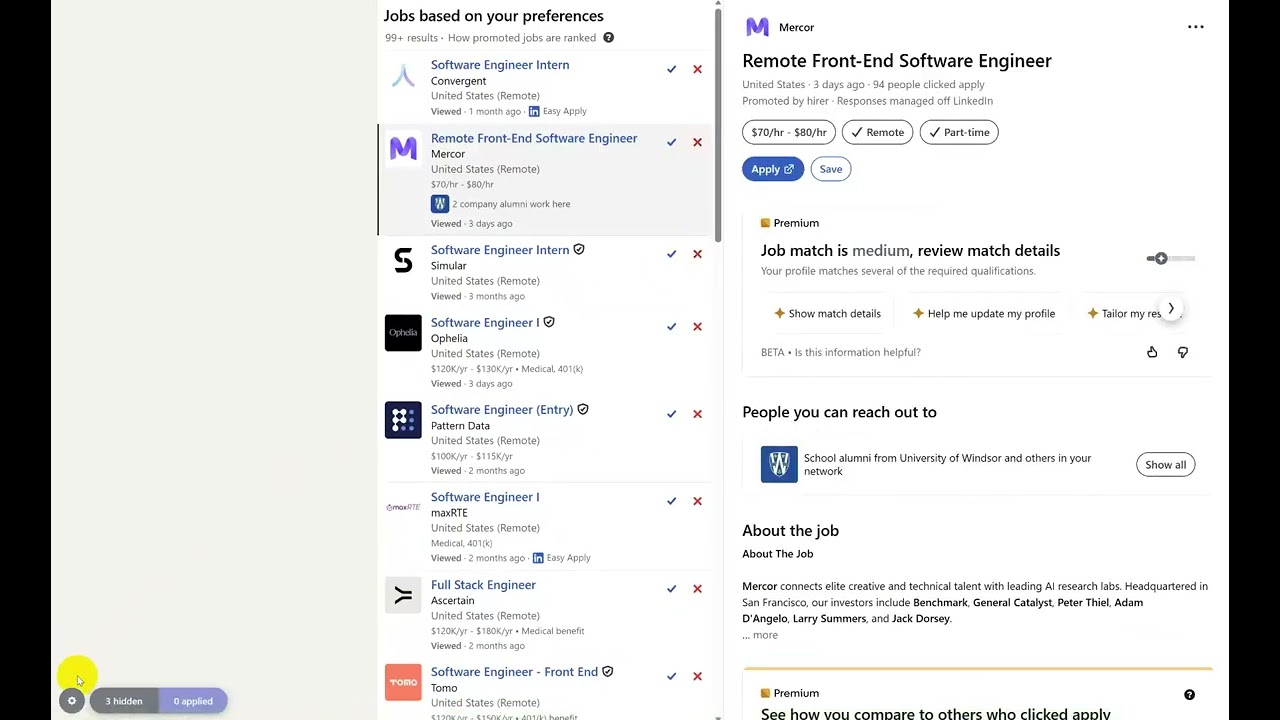
- One-click hide -- permanently hide individual jobs with a single click
- Block companies -- right-click to hide all jobs from a specific poster, current and future
- Mark as applied -- track jobs you've applied to so they stop appearing in results
- Animated dismiss -- hidden cards collapse with a smooth animation instead of vanishing
- Country filter -- show only jobs from the United States, Canada, or both
- Time filter -- filter by posting date: this week, last 2 weeks, last 3 weeks, or this month
- Hidden jobs list -- searchable, paginated modal with bulk select and unhide
- Hidden posters list -- separate tab to manage blocked companies
- Applied jobs list -- dedicated modal to view and unmark applied jobs
- Select all / bulk actions -- select all visible items, unhide or unmark in bulk
- Export / import -- back up your data as JSON, restore it on another machine
- Search results -- job collections, recommendations, and search pages
- Job detail pages -- hide or mark applied directly from the detail view
- Cross-tab sync -- changes reflect instantly across all open LinkedIn tabs
- Auto-select next card -- after hiding, the next job automatically loads in the detail panel
- 100% local -- all data stays in your browser via Chrome's storage API
- No tracking -- zero analytics, zero network requests, zero external servers

Install from the Chrome Web Store.
- Browse LinkedIn job search as usual
- Click the red X on any job card to hide it permanently
- Click the green checkmark to mark a job as applied
- Right-click the red X to hide all jobs from that company
- Use the floating bar (bottom-left) to:
- Open the filter popup (gear icon) to filter by country or date
- View and manage hidden items (hidden count pill)
- View and manage applied jobs (applied count pill)
- On job detail pages, use the Hide job and Mark applied buttons
This extension does not collect, transmit, or share any personal data. All data is stored locally on your device using Chrome's storage API. No analytics, no tracking, no external servers.
See the full Privacy Policy.
Found a bug or have a feature request? Open an issue.
This is proprietary software. Source code is not publicly available.