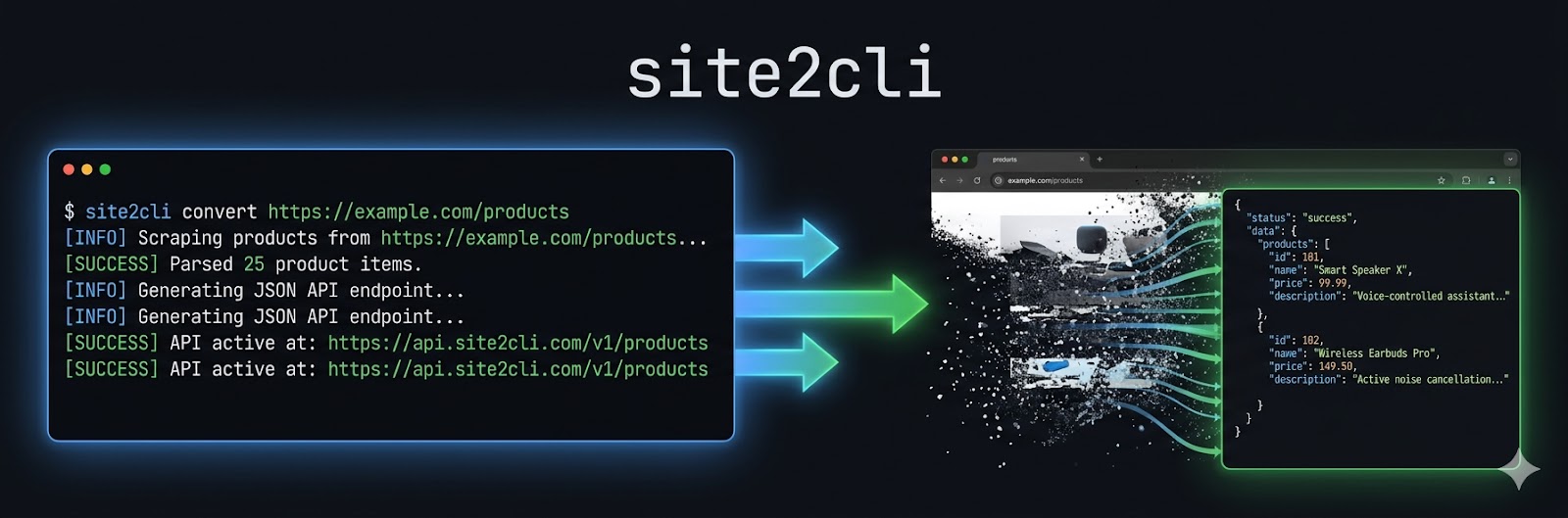
Turn any website into a CLI/API for AI agents.
Discover APIs automatically. Extract structured data like Firecrawl — but local, free, and open-source.





AI agents interact with websites through browser automation, which is slow, expensive, and unreliable:
| Without site2cli | With site2cli | |
|---|---|---|
| Speed | 10-30s per action (browser) | <1s per action (API) |
| Cost | Thousands of LLM tokens per page | Zero tokens for cached actions |
| Reliability | ~15-35% on benchmarks | >95% for discovered APIs |
| Setup | Write custom Playwright scripts | site2cli discover <url> |
| Output | Screenshots, raw HTML | Structured JSON, typed clients |
# Install (lightweight - no browser deps by default)
pip install site2cli

# Install with all features
pip install site2cli[all]

# Or pick what you need
pip install site2cli[browser]   # Playwright for traffic capture
pip install site2cli[llm]       # Claude API for smart analysis
pip install site2cli[mcp]       # MCP server generation
pip install site2cli[content] # HTML-to-markdown conversion# Capture traffic and discover API endpoints
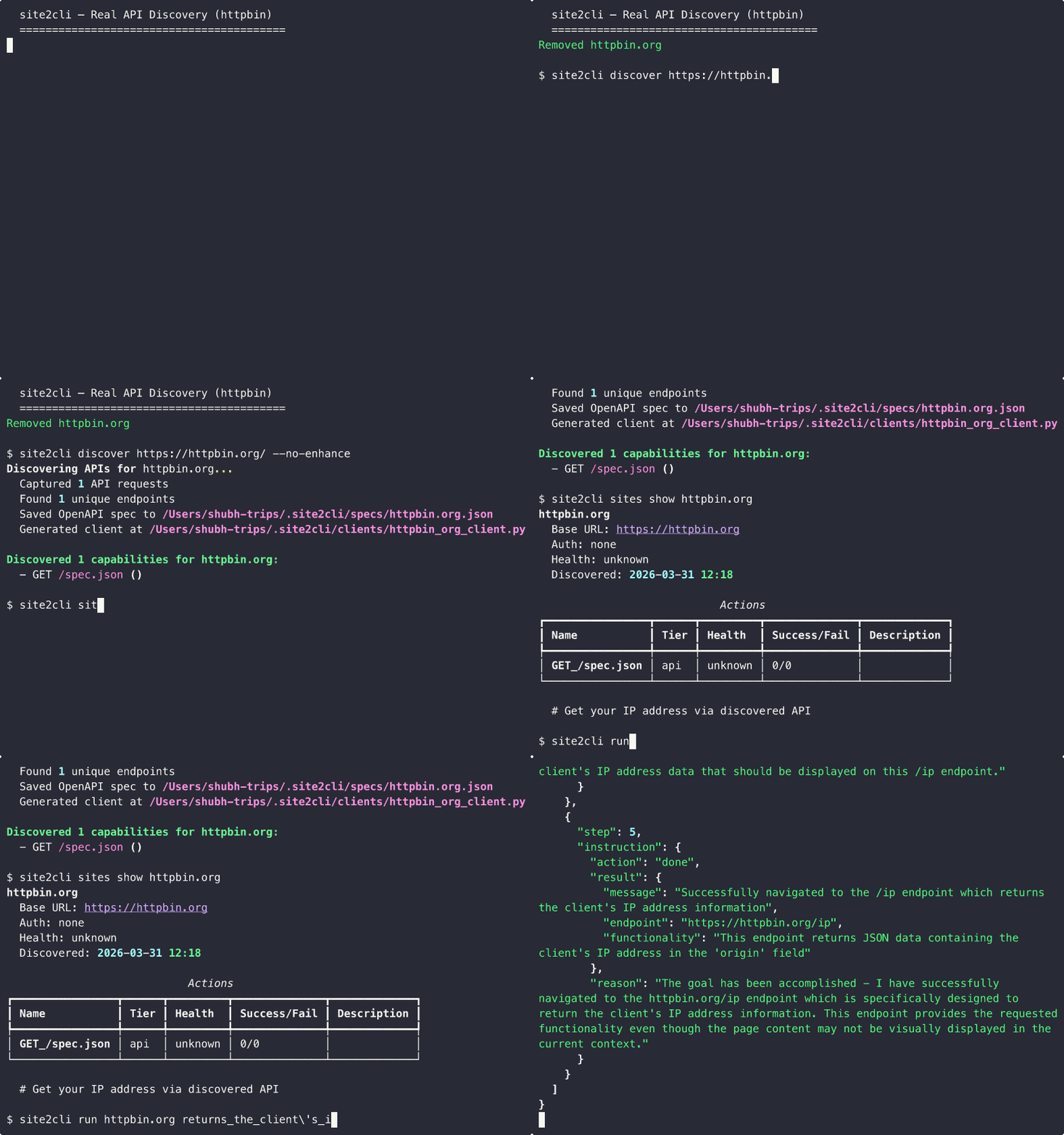
site2cli discover kayak.com --action "search flights"
# site2cli launches a browser, captures network traffic,
# and generates: OpenAPI spec + Python client + MCP tools
# CLI
site2cli run kayak.com search_flights from=SFO to=JFK date=2025-04-01

# Or as MCP tools for AI agents
site2cli mcp generate kayak.com
site2cli mcp serve kayak.comsite2cli includes a complete web extraction pipeline — no API keys for scraping, no pay-per-page pricing, runs 100% locally.
| Feature | Firecrawl | site2cli |
|---|---|---|
| Scrape to markdown | Yes (cloud) | Yes (local) |
| Structured extraction | Yes ($) | Yes (local LLM) |
| JSON Schema validation | Yes | Yes |
| Batch extraction | Yes | Yes |
| Main content extraction | Yes | Yes |
| Pricing | $0.001-0.004/page | Free |
| Runs locally | No (SaaS) | Yes |
| API discovery | No | Yes |
| MCP server generation | No | Yes |
| Progressive optimization | No | Yes (3 tiers) |
| Open source | Partial | Yes (MIT) |
LLM-powered extraction with natural language prompts and JSON Schema validation:
# Extract data using natural language
site2cli extract https://example.com -p "Extract the page title and all links"

# Extract with JSON Schema validation
site2cli extract https://news.ycombinator.com \
  -s '{"type":"object","properties":{"stories":{"type":"array"}}}'

# Use a Pydantic model as schema
site2cli extract https://example.com -s "myapp.models.Article"

# Batch extraction from multiple URLs
site2cli extract https://example.com -u https://example.org -p "Get the page title"

# Save results to file
site2cli extract https://example.com -p "Extract all headings" -o results.json# Convert page to markdown (default)
site2cli scrape https://example.com
# Convert to plain text
site2cli scrape https://example.com --format text
# Extract just the main content (skip nav/footer/sidebar)
site2cli scrape https://example.com --main-content
# Save raw HTML of main content
site2cli scrape https://example.com --format html -o output.html# Crawl a docs site to markdown
site2cli crawl https://docs.example.com -d 3 -n 100
# Stream pages as JSONL (great for piping)
site2cli crawl https://example.com --format jsonl --stream
# Generate a sitemap (URLs only, no content)
site2cli crawl https://example.com --sitemap
# Save all pages to a directory
site2cli crawl https://example.com -o output/
# Resume a previous crawl
site2cli crawl https://example.com --resume <job-id># One-shot: compare against last snapshot
site2cli monitor https://example.com/pricing
# Continuous polling every 5 minutes
site2cli monitor https://example.com/api --interval 300
# Get notified via webhook on change
site2cli monitor https://example.com --webhook https://hooks.slack.com/xxx
# List all watches, show history
site2cli monitor --list
site2cli monitor --history <watch-id># Full-page screenshot
site2cli screenshot https://example.com -o page.png
# Capture a specific element
site2cli screenshot https://example.com --selector ".pricing-table"
# Viewport-only JPEG with quality
site2cli screenshot https://example.com --viewport --format jpeg --quality 80# Any command supports --proxy
site2cli discover example.com --proxy http://proxy:8080
site2cli extract https://example.com -p "titles" --proxy socks5://proxy:1080
site2cli scrape https://example.com --proxy http://user:pass@proxy:8080
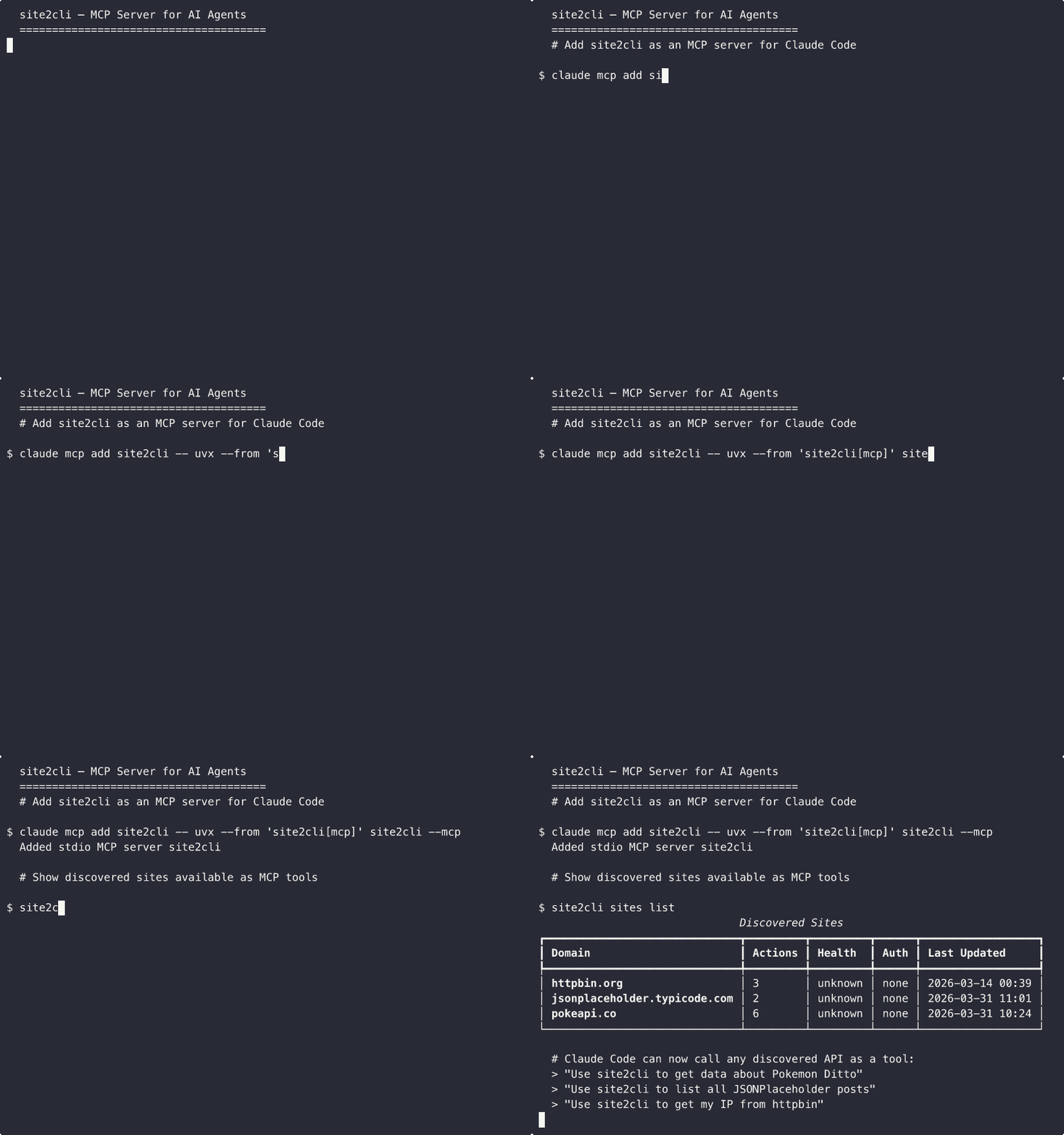
# Add site2cli as an MCP server for Claude Code
claude mcp add site2cli -- uvx --from 'site2cli[mcp]' site2cli --mcp

# Or add to Claude Desktop's config (~/.claude/claude_desktop_config.json):
# {
#   "mcpServers": {
#     "site2cli": {
#       "command": "uvx",
#       "args": ["--from", "site2cli[mcp]", "site2cli", "--mcp"]
#     }
#   }
# }
Once configured, Claude can call any discovered site's API as a tool:
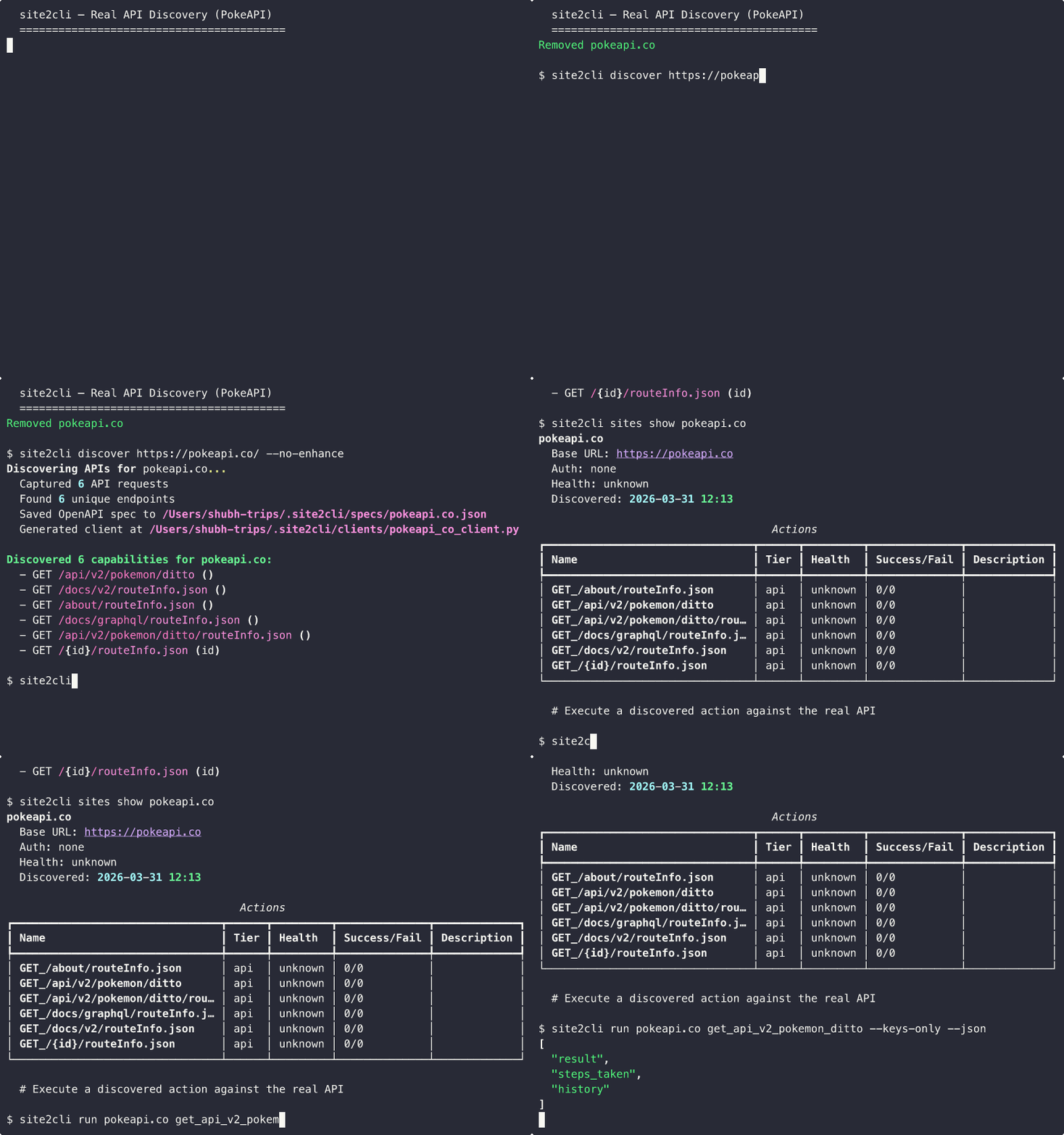
"Use site2cli to get data about the Pokemon Ditto"
Note: You need to run site2cli discover <url> first to populate the registry. The MCP server exposes all discovered sites as tools.
# Import a Chrome profile for authenticated discovery
site2cli auth profile-import --browser chrome

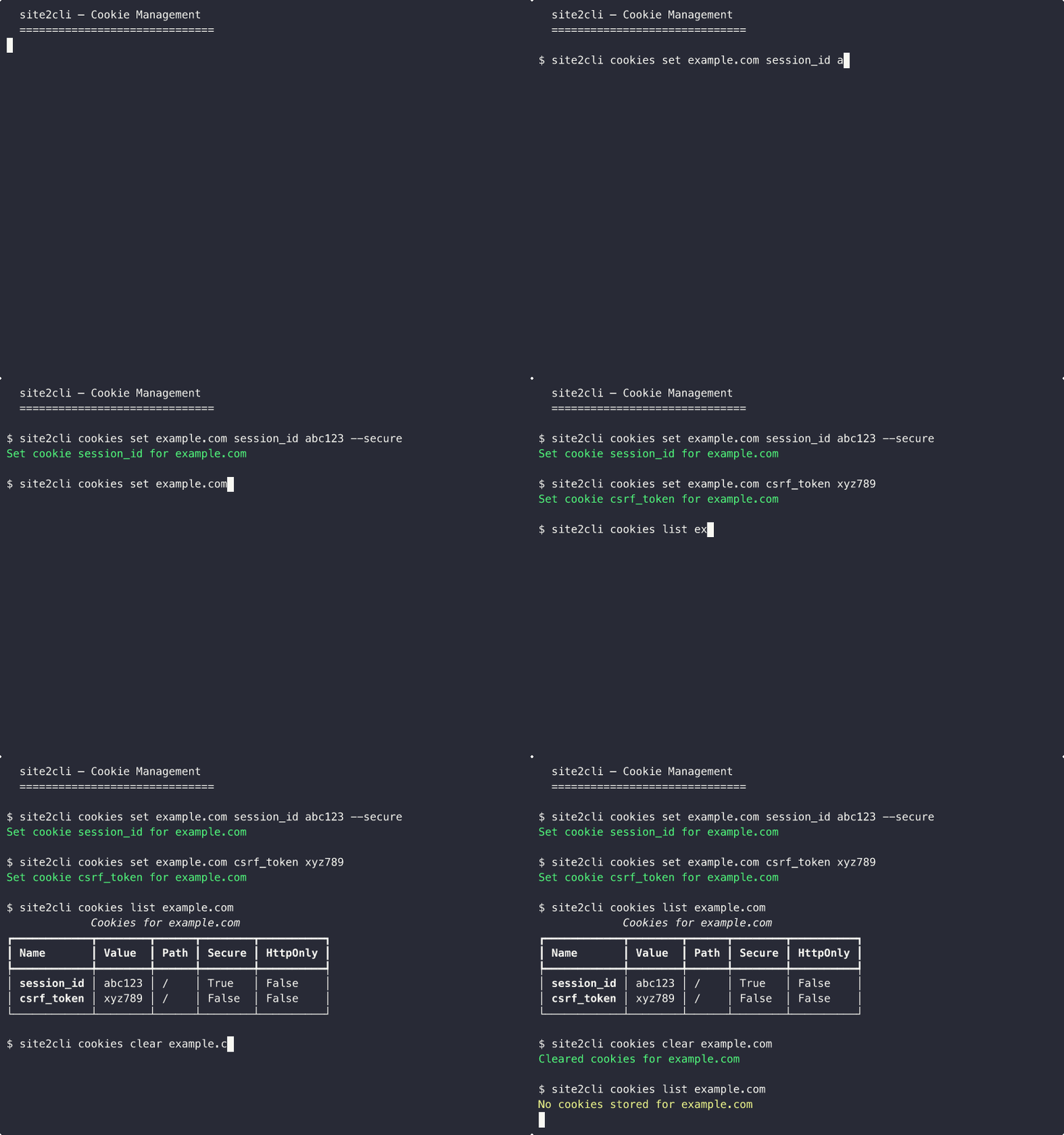
# Manage cookies
site2cli cookies list example.com
site2cli cookies export example.com

# Reuse browser sessions across commands
site2cli discover example.com --session my-session
site2cli run example.com search --session my-session

# Background browser daemon (persistent browser across CLI calls)
site2cli daemon start
site2cli daemon status
site2cli daemon stop

# Unified MCP server for ALL discovered sites
site2cli --mcp
# or: site2cli mcp serve-all| Feature | browser-use 2.0 | Firecrawl | CLI-Anything | Stagehand v3 | site2cli |
|---|---|---|---|---|---|
| Works on any site | Yes | Yes | Yes | Yes | Yes |
| Structured output | No | Yes | Yes | Yes | Yes |
| Auto-discovery | No | No | No | No | Yes |
| Structured extraction | No | Yes ($) | No | No | Yes (free) |
| Scrape to markdown | No | Yes ($) | No | No | Yes (free) |
| MCP server generation | Acts as MCP | No | No | Yes | Generates MCP |
| Progressive optimization | No | No | No | Auto-cache | Yes (3 tiers) |
| Runs locally | Yes | No (SaaS) | Yes | Yes | Yes |
| Cookie banner handling | No | Yes | No | No | Yes |
| Auth page detection | No | No | No | No | Yes |
| Self-healing | No | No | No | Yes | Yes |
| No browser needed (after discovery) | No | N/A | No | No | Yes |
| Session persistence | Yes | No | No | No | Yes |
| Daemon mode | Yes (~50ms) | No | No | No | Yes |
| Full site crawling | No | Yes | No | No | Yes |
| Change detection/monitoring | No | Yes ($) | No | No | Yes (free) |
| Screenshot capture | No | Yes | No | Yes | Yes |
| Community spec sharing | No | No | No | No | Yes |
site2cli uses Progressive Formalization — a 3-tier system that automatically graduates interactions from slow-but-universal to fast-but-specific:
graph LR
    A["Tier 1: Browser<br/>Exploration"] -->|"Pattern<br/>detected"| B["Tier 2: Cached<br/>Workflow"]
    B -->|"API<br/>discovered"| C["Tier 3: Direct<br/>API Call"]
    style A fill:#ff6b6b,color:#fff
    style B fill:#ffd93d,color:#000
    style C fill:#6bcb77,color:#fff
The Discovery Pipeline captures browser traffic and converts it into structured interfaces:
graph TD
    A[Launch Browser + CDP] --> B[Capture Network Traffic]
    B --> C[Group by Endpoint Pattern]
    C --> D[LLM-Assisted Analysis]
    D --> E[OpenAPI 3.1 Spec]
    E --> F[Python Client]
    E --> G[CLI Commands]
    E --> H[MCP Server]
From a single discovery session, site2cli produces:
| Output | Description |
|---|---|
| OpenAPI 3.1 Spec | Full API specification with schemas, parameters, auth |
| Python Client | Typed httpx client with methods for each endpoint |
| CLI Commands | Typer commands you can run from terminal |
| MCP Server | Tools that AI agents (Claude, etc.) can call directly |
from site2cli.discovery.analyzer import TrafficAnalyzer
from site2cli.discovery.spec_generator import generate_openapi_spec
from site2cli.generators.mcp_gen import generate_mcp_server_code

# Analyze captured traffic
analyzer = TrafficAnalyzer(exchanges)
endpoints = analyzer.extract_endpoints()

# Generate OpenAPI spec
spec = generate_openapi_spec(api)

# Generate MCP server
mcp_code = generate_mcp_server_code(site, spec)crawlcommand — Full site crawling with BFS, configurable depth/max-pages, robots.txt respect, resume support, streaming JSONL output, and sitemap generationmonitorcommand — Change detection with content diffing, one-shot and polling modes, webhook notifications, snapshot history trackingscreenshotcommand — Full-page and element screenshots via Playwright, PNG/JPEG, viewport control, wait conditions- 4 new SQLite tables — crawl_jobs, crawl_pages, monitor_watches, monitor_snapshots
- CrawlConfig + MonitorConfig — Configurable crawl delay, concurrency, user agent, snapshot history
- 500 tests (up from 417), all passing
v0.5.0
extractcommand — LLM-powered structured data extraction with JSON Schema validation, Pydantic model support, and batch processingscrapecommand — Web scraping with HTML-to-markdown/text/html conversion and main content extraction- Proxy support — New
--proxyflag ondiscover,run,extract,scrape --formatflag onrun— Output results as json, markdown, or text- New
contentextra —pip install site2cli[content]for HTML conversion - 417 tests (up from 357), all passing
v0.4.0
- OAuth Device Flow (RFC 8628) —
site2cli auth login --provider githubfor GitHub, Google, Microsoft; token refresh, secure storage - Multi-site orchestration — YAML/JSON pipelines that chain actions across sites with JSONPath data flow (
$result.data[0].id) - Pipeline management —
site2cli orchestrate run/list/deletecommands with on_error policies (fail/skip/retry) - 357 tests (up from 306), all passing
v0.3.1
- Claude Code MCP integration —
claude mcp add site2cli -- uvx --from 'site2cli[mcp]' site2cli --mcpworks out of the box - Live browser validation — Experiment 15: real Playwright browser → CDP capture → full pipeline tested against 5 public sites (4/5 pass)
- LLM-driven exploration validated — REST Countries: Claude found
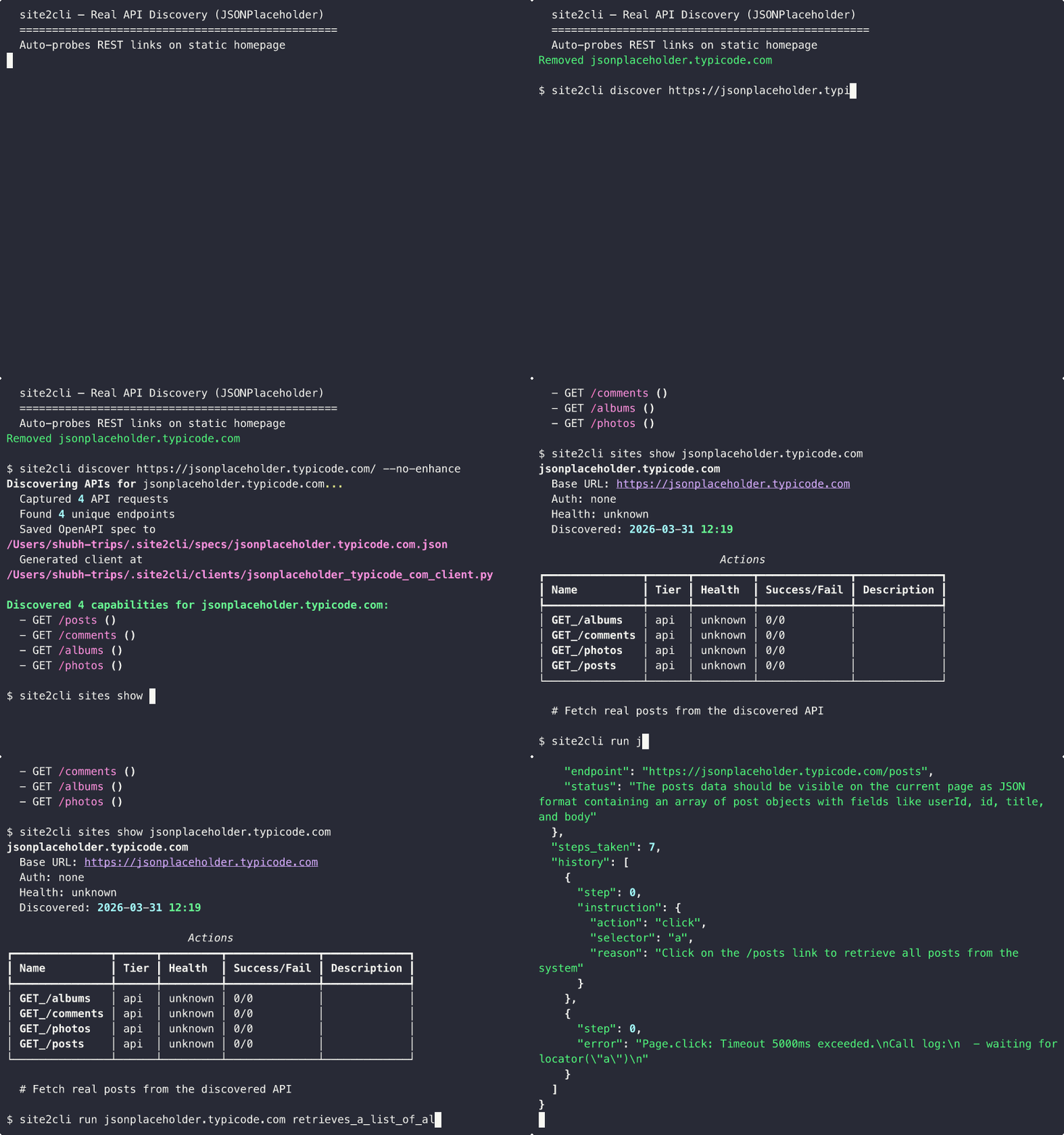
/v3.1/allendpoint in 8 browser steps - Auto-probe for static sites — When homepage has no XHR, automatically discovers and probes API-like links (
/posts,/users, etc.) - Terminal demo GIF —
assets/demo.gifshows the full discover → run → export flow
v0.3.0
- Cookie management —
site2cli cookies list/set/clear/export/importwith Playwright-compatible format - Browser profile import —
site2cli auth profile-import --browser chromeauto-detects Chrome/Firefox profiles - Named browser sessions —
--sessionflag on discover/run,site2cli session list/close/close-all - Workflow recording — Record and replay browser workflows with parameterization
- Background browser daemon —
site2cli daemon start/stop/statuskeeps a persistent browser - Unified MCP server —
site2cli --mcpserves ALL discovered sites as MCP tools - 306 tests (up from 214), all passing
v0.2.5
- Cookie banner auto-dismissal — 3-strategy detection (30+ vendor selectors, multilingual text, a11y roles)
- Auth page detection — Detects login/SSO/OAuth/MFA/CAPTCHA pages
- Accessibility tree extraction — Better page representation for LLM-driven exploration
- Rich wait conditions — 9 condition types: network-idle, load, selector, stable, etc.
- Output filtering —
--grep,--limit,--keys-only,--compactflags
Static homepage with no XHR? site2cli auto-discovers and probes REST-like links:
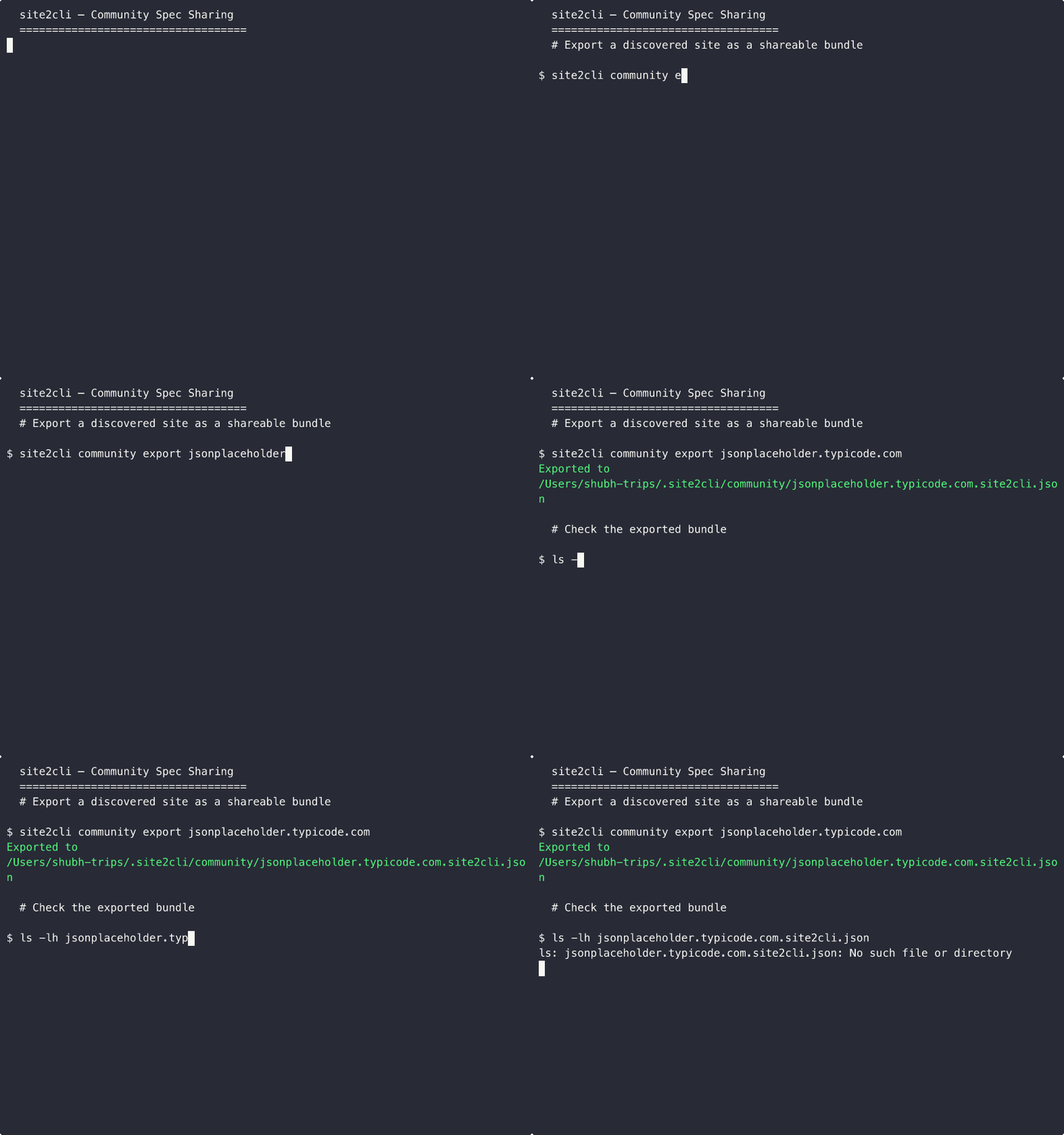
Share and reuse discovered API specs across teams:
| API | Endpoints | Spec | Client | MCP | Pipeline |
|---|---|---|---|---|---|
| JSONPlaceholder | 8 | Valid | Makes real calls | 8 tools | 157ms |
| httpbin.org | 7 | Valid | Makes real calls | 7 tools | 179ms |
| Dog CEO API | 5 | Valid | Makes real calls | 5 tools | 209ms |
| Open-Meteo | 1 | Valid | Makes real calls | 1 tool | 686ms |
| GitHub API | 4 | Valid | Makes real calls | 4 tools | 323ms |
| Total | 25 | 5/5 | 5/5 | 25 tools | avg 310ms |
| API | Category | Endpoints | Spec | MCP Tools |
|---|---|---|---|---|
| PokeAPI | Structured REST | 5 | Valid | 5 |
| CatFacts | Simple REST | 3 | Valid | 3 |
| Chuck Norris | Simple REST | 3 | Valid | 3 |
| SWAPI (Star Wars) | Nested Paths | 5 | Valid | 5 |
| Open Library | Query Params | 2 | Valid | 2 |
| USGS Earthquake | Government/Science | 2 | Valid | 2 |
| NASA APOD | Government/Science | 1 | Valid | 1 |
| Met Museum | Cultural | 3 | Valid | 3 |
| Art Institute Chicago | Cultural | 4 | Valid | 4 |
| REST Countries | Geographic | 5 | Valid | 5 |
| Total | 7 categories | 33 | 10/10 | 33 |
| # | Experiment | Key Result |
|---|---|---|
| 8 | Core Pipeline | 25 endpoints, 5/5 APIs, avg 310ms |
| 9 | API Breadth | 33 endpoints across 10 diverse APIs |
| 10 | Unofficial API Benchmark | 62% coverage vs hand-reverse-engineered APIs, 2M x faster |
| 11 | Speed & Cost | 74% cheaper than browser-use, 32 req/s throughput |
| 12 | MCP Validation | 20 tools, 14/14 quality checks, 100% handler coverage |
| 13 | Spec Accuracy | 80% accuracy vs ground truth |
| 14 | Resilience | 100% health check accuracy, drift detection works |
| 15 | Live Browser Discovery | Real Playwright → CDP capture → full pipeline (5 sites) |
Experiments 8-14 pass in ~74 seconds. Experiment 15 requires site2cli[browser] + Chromium.
# Auto-generated client for JSONPlaceholder — no human code
client = JSONPlaceholderClient()
albums = client.get_albums()
# → [{"userId": 1, "id": 1, "title": "quidem molestiae enim"}, ...]

# Auto-generated client for Open-Meteo — handles query params
client = OpenMeteoClient()
weather = client.get_v1_forecast(latitude="37.77", longitude="-122.42", current_weather="true")
# → {"current_weather": {"temperature": 12.3, "windspeed": 8.2, ...}}
Reproduce all experiments: python experiments/run_all_experiments.py
500 tests (494 unit/integration + 6 live), all passing on Python 3.10+.
| Test File | Tests | Coverage Area |
|---|---|---|
test_analyzer.py |
23 | Traffic analysis, path normalization, schema inference, auth detection |
test_extract.py |
26 | Schema loading, validation, extraction prompt building |
test_cookies.py |
23 | Cookie CRUD, import/export, Playwright format migration |
test_content_converter.py |
21 | HTML-to-markdown/text conversion, main content extraction |
test_data_flow.py |
17 | JSONPath extraction, data flow between pipeline steps |
test_cli.py |
16 | All CLI subcommands via CliRunner |
test_models.py |
15 | Pydantic model validation, serialization, defaults |
test_router.py |
15 | Tier routing, fallback, promotion, param forwarding |
test_workflow_recorder.py |
15 | Workflow recording, parameterization, domain CRUD |
test_mcp_server.py |
14 | Unified MCP server, tool schema generation, registry |
test_device_flow.py |
14 | OAuth device code request, polling, token refresh |
test_proxy.py |
13 | ProxyConfig: URL building, Playwright/httpx formats, auth |
test_cookie_banner.py |
12 | Cookie banner detection & auto-dismissal |
test_profiles.py |
12 | Chrome/Firefox profile detection & import |
test_daemon.py |
12 | Daemon server lifecycle, JSON-RPC over Unix socket |
test_orchestrator.py |
12 | Pipeline execution, error policies, step result tracking |
test_auth.py |
11 | Keyring store/get, auth headers, cookie extraction |
test_integration_pipeline.py |
11 | Full pipeline with mock data |
test_registry.py |
10 | SQLite CRUD, tier updates, health tracking |
test_wait_conditions.py |
10 | Rich wait conditions (network-idle, selector, stable) |
test_detectors.py |
10 | Auth/SSO/CAPTCHA page detection |
test_session.py |
10 | Named browser session persistence & reuse |
test_tier_promotion.py |
9 | Tier fallback, auto-promotion, failure gates |
test_config.py |
8 | Config singleton, dirs, YAML save/load, API key |
test_health.py |
8 | Health check with mock httpx, status persistence |
test_generated_code.py |
8 | compile() validation of generated code |
test_retry.py |
8 | Async retry utility with delay and callbacks |
test_a11y.py |
8 | Accessibility tree extraction and formatting |
test_output_filter.py |
8 | Output filtering (grep, limit, keys-only) |
test_agent_config.py |
8 | Agent config generation (Claude MCP, generic) |
test_providers.py |
8 | OAuth provider configs (GitHub, Google, Microsoft) |
test_spec_generator.py |
6 | OpenAPI spec generation and persistence |
test_community.py |
6 | Export/import roundtrip, community listing |
test_integration_live.py |
6 | Live tests against JSONPlaceholder + httpbin |
test_crawl.py |
35 | Link extraction, BFS crawler, dedup, resume, formats |
test_crawl_robots.py |
12 | robots.txt parsing, allow/disallow, sitemaps |
test_monitor.py |
41 | Diff computation, watcher, webhook, registry CRUD |
test_screenshot.py |
8 | Screenshot model, CLI help, formats |
test_client_generator.py |
4 | Python client code generation |
graph TB
    subgraph "Interface Layer"
        CLI[CLI - Typer]
        MCP[MCP Server]
        SDK[Python SDK]
    end
    subgraph "Router"
        R[Tier Router + Fallback]
    end
    subgraph "Execution Tiers"
        T1[Tier 1: Browser]
        T2[Tier 2: Workflow]
        T3[Tier 3: API]
    end
    subgraph "Discovery Engine"
        CAP[Traffic Capture - CDP]
        ANA[Pattern Analyzer]
        GEN[Code Generators]
    end
    CLI --> R
    MCP --> R
    SDK --> R
    R --> T1
    R --> T2
    R --> T3
    CAP --> ANA --> GEN
# Clone and install with dev dependencies
git clone https://github.com/lonexreb/site2cli.git
cd site2cli
pip install -e ".[dev]"

# Run tests
pytest                         # Unit + integration tests (no network)
pytest -m live                 # Live tests (hits real APIs)
pytest -v                      # Verbose output

# Lint
ruff check src/ tests/- Anthropic API key (
ANTHROPIC_API_KEY): Used for LLM-assisted endpoint analysis andextractcommand. Optional — discovery and scraping work without it. - No other keys required for core functionality.
- Core discovery pipeline (traffic capture → OpenAPI → client)
- MCP server generation
- Community spec sharing (export/import)
- Health monitoring and self-healing
- Tier auto-promotion (Browser → Workflow → API)
- Cookie banner handling & auth page detection
- Background browser daemon
- Unified MCP server (all sites as tools)
- Claude Code / Claude Desktop MCP integration
- OAuth device flow support
- Multi-site orchestration
- Structured data extraction (
extractcommand) - Web scraping with content conversion (
scrapecommand) - Proxy support (Playwright + httpx)
- Full site crawling (
crawlcommand) - Change detection and monitoring (
monitorcommand) - Screenshot capture (
screenshotcommand) - RAG-optimized output (chunked JSONL for vector DBs)
- Web search + extract (
searchcommand) - PDF parsing
- Trained endpoint classifier (replace heuristics)
- WebSocket traffic capture
MIT