RSA is the most commonly used asymmetric cryptographic algorithm used in transmitting data over the web. Algorithm is explained in the below diagram.

Here is block diagram of RSA algorithm:

This project contains implementation of RSA crypto processor in FPGA using VHDL. The program was designed, developed, synthesized and implemented using Xilinx Vivado Design Suite on Nexys 4 FPGA board. To make an efficient RSA crypto processor, I have used Montgomery technique for modular multiplication and exponentiation, which avoid normal division operation and replaces with shift-and-add operation.
Below is the Montgomery modular multiplication algorithm implemented in this project.

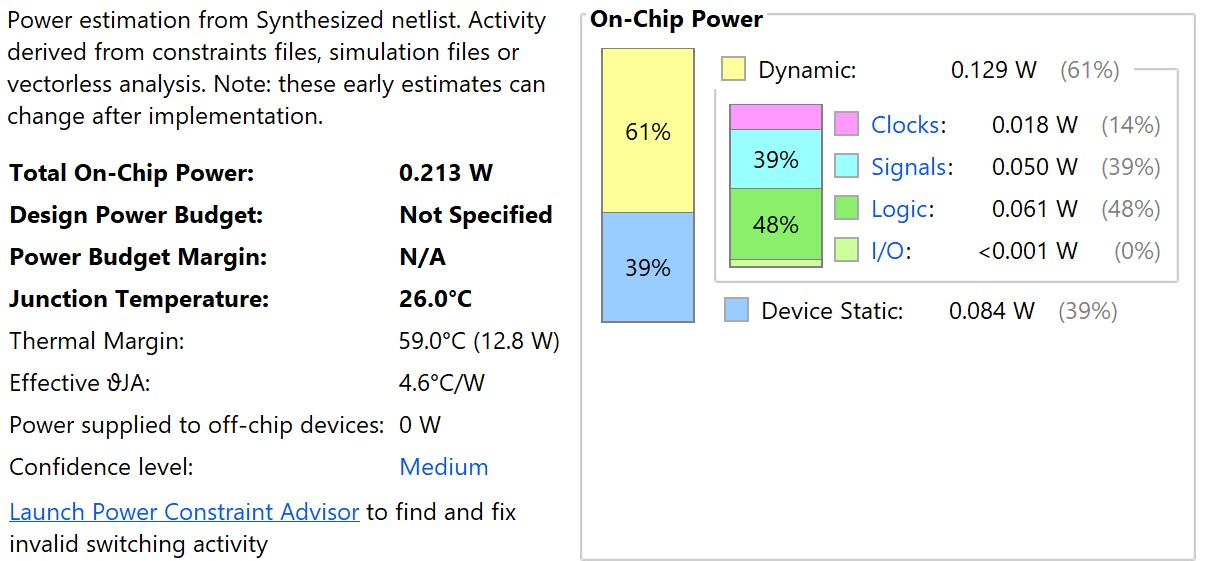
Here's power estimation summary for RSA in FPGA:
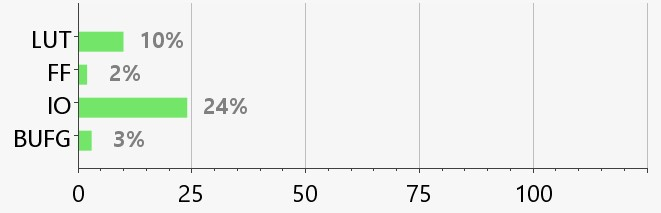
Below is resource utilization summary for RSA in FPGA:
Python needs to be installed to program using Qiskit. IBM recommends installing Anaconda, which is a cross platform Python distribution for scientific computing. Jupyter Notebooks included with Anaconda is recommended platform to programming Qiskit.
Here are steps in installing Qiskit on Windows.
- Install Anaconda
- Open Anaconda Prompt
- Create a environment with specific version of Python:
conda create -n name_of_my_env python=3 - Activate your environment:
activate name_of_my_env - Install Qiskit:
pip install qiskit
Qiskit is an open source SDK (Software Development Kit) created by IBM, which allows us to access real Quantum computer via cloud. Before starting to code for Quantum computers, an account needs to be created with IBM Q experience to interact with Quantum simulator. This generates a token, which provides access to IBM's Quantum computer. Programs can be written in Python in Jupyter Notebook to work with IBM's Quantum computer.
After installing Qiskit using pip install command, first step to start coding in the IBM's Quantum computer is to enable your account with the token provided in the IBM Q experience. This can be done by the following lines of code in Jupyter notebook.
from qiskit import IBMQ
provider = IBMQ.enable_account('<your-token>')
qasm_sim = provider.get_backend('ibmq_qasm_simulator')
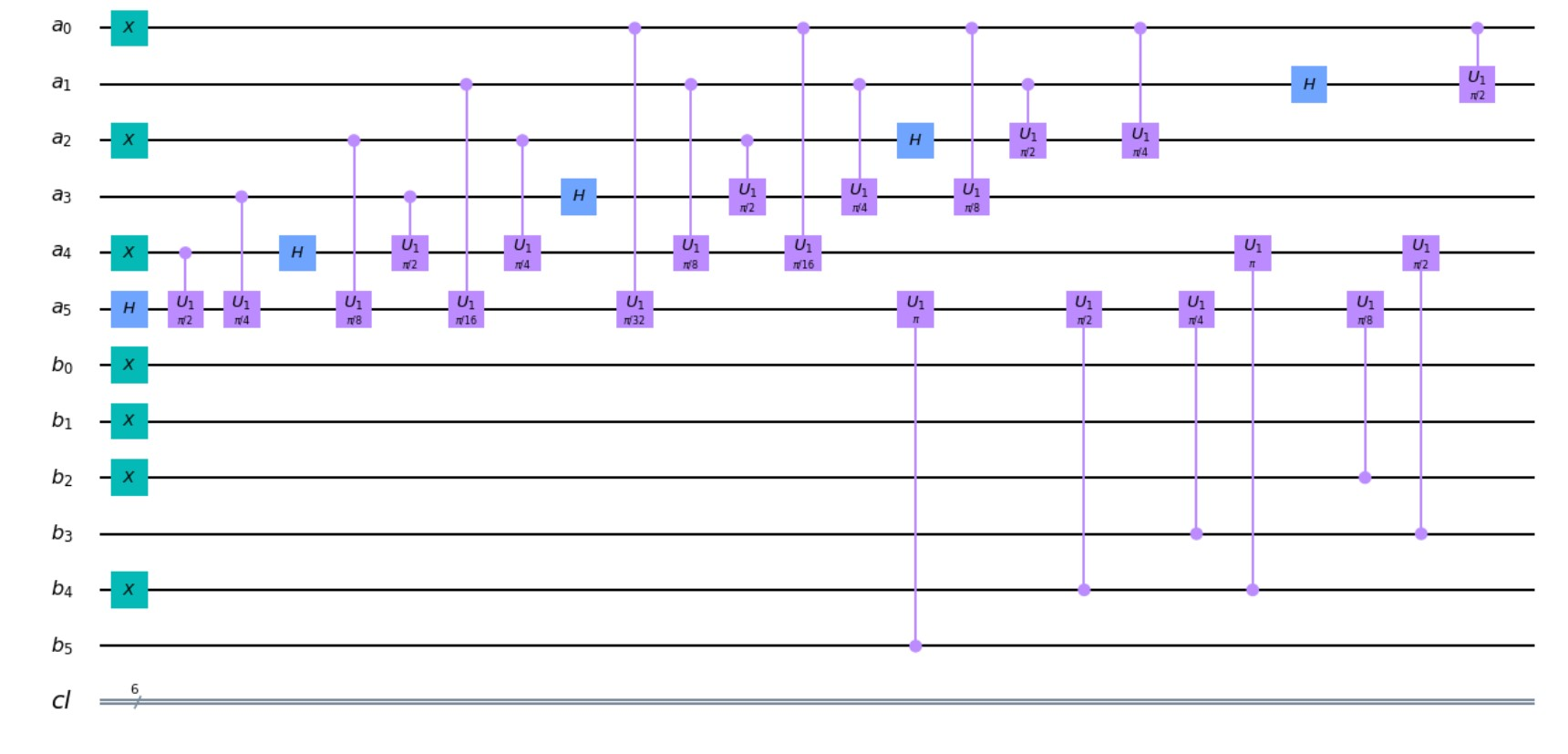
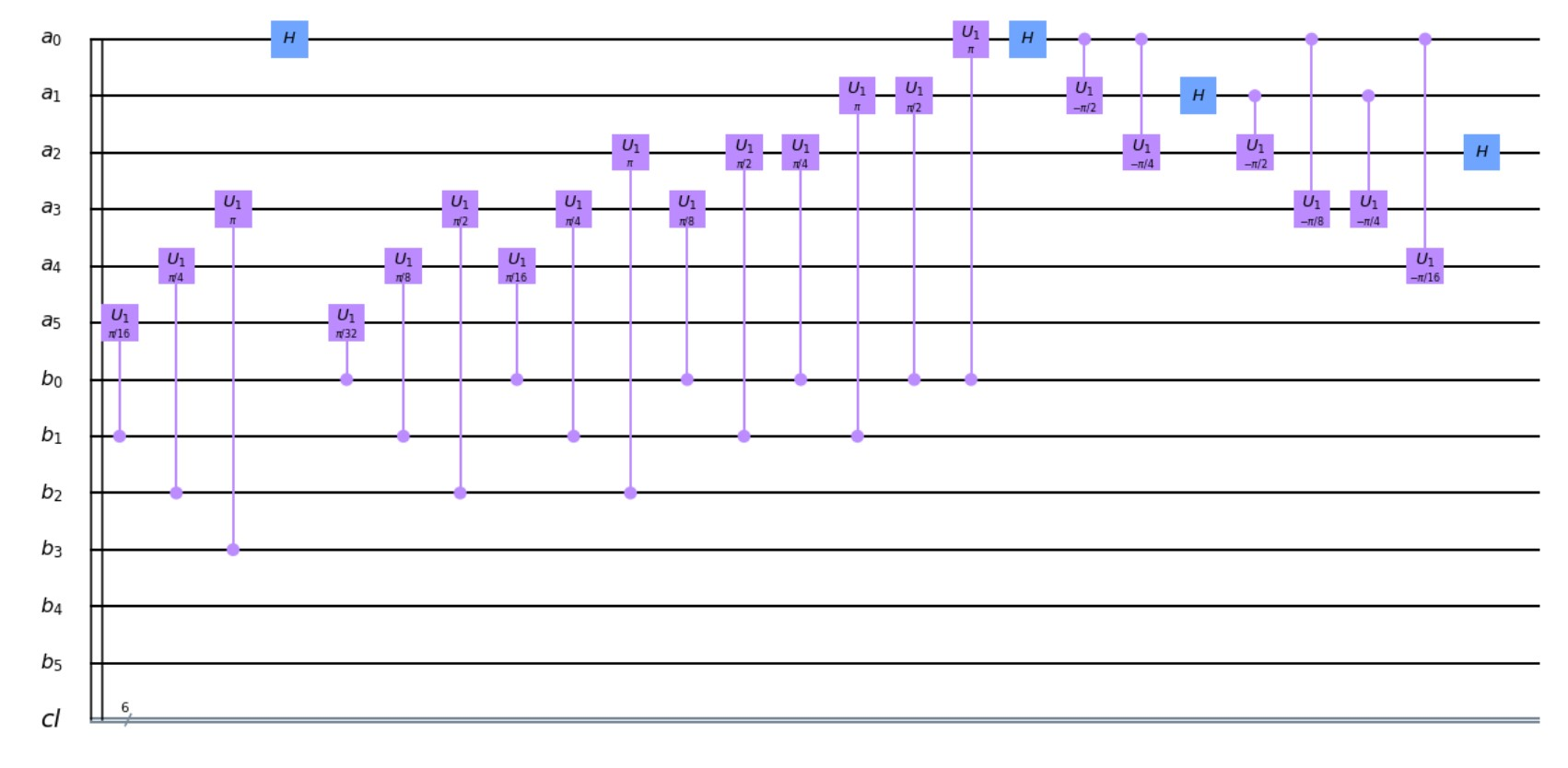
This project uses Quantum Fourier Transform (QFT) adder to perform fast addition and it serves as a base component for multiplication and exponentiation operations.
Quantum circuit of QFT adder is shown below:

This project contains source code for RSA algorithm implemented in VHDL and Qiskit. Here are steps in building this project.
- Install Qiskit following the above steps
- Clone this repository
- Open
src/rsa/qiskitfolder in Jupyter, which is included with Qiskit - Before compiling and building the source code, an IBM Q account needs to be created and a
tokenneeds to be generated to access IBM's Quantum Simulators via Qiskit. See instructions here to generate atoken. - Provide the obtained
tokeninto the source code to build necessary functions.
from qiskit import IBMQ
provider = IBMQ.enable_account('<your-token>')
Re-usable Python functions are written as Python files and these functions are used in Jupyter Notebook files. You can run individual Notebook which will use necessary functions needed to produce the result.
Lavanya Gnanasekaran, Graduate student, Electrical and Computer Engineering department, College of Engineering, California State Polytechnic University, Pomona.
1. Mohamed El-Hadedy: Assistant Professor, Electrical and Computer Engineering department, College of Engineering, California State Polytechnic University, Pomona.
Collaborators:
1. Wen-Mei Hwu: Director of Center for Cognitive Computing Systems Research and Walter J. Sanders III-AMD Endowed Chair Professor in Elecrical and Computer Engineering at UIUC
2. Jinjun Xiong: Director of Center for Cognitive Computing Systems Research and Adjunct Research Professor at UIUC
RSA has been implemented using Qiskit Quantum Computing tool and FPGA using VHDL. Qiskit is programmable through Jupyter Notebook using Python programming language. Jupyter Notebooks and re-usable Python functions are available inside qiskit folder. VHDL code responsible for running RSA algorithm in FPGA is available inside vhdl folder.