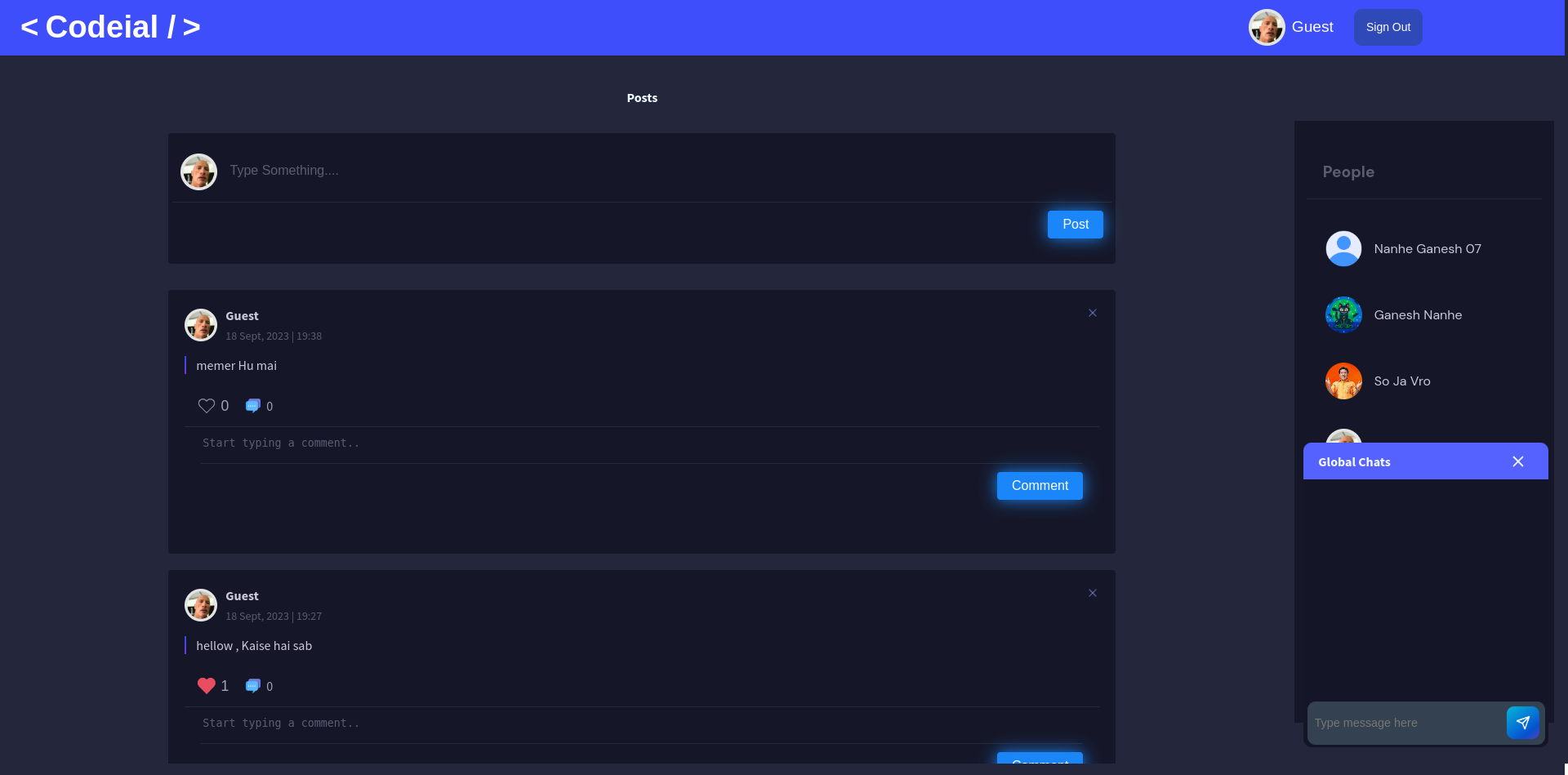
Checkout the Website Web Application
Codeial is a Social Media Website designed using Full Stack Web Development through Back-End Technology of MEN Stack (MongoDB, ExpressJS, NodeJS), RedisDB, GulpJS & Passport Auths. Users are able to create, share the posts and connect with each other across the platform. This website is completely Responsive across all the Devices.
- Users are able to login through social & manual login. They can also reset their passwords using 'Forgot Password'.
- Users receive emails for resetting password links, for creating post-comments, profile updation, account creation, receiving comments.
- Users can chat with other users. Users get notified when they receive a new message & also when the other friend is online.
- Users can like both posts - comments & can create the posts and comments.
- Users can update their profiles.
- Users can add other users as friends.
- JWT functionality is also present in the code but is not used.
- Fork the Project in your Repository.
- Clone the Forked Repository in your Local System.
- Install & Configure - NodeJS, MongoDB, Robo3T, POSTMAN, WSL & Redis Server
- Create '.env' file & Set the Environment Variables in it, as per the 'ENV_FORMAT.json' file.
- Run 'npm install' in GitBash Terminal
- Go to 'package.json' & inside the 'SCRIPTS', find "start":"...."
Change it to - "start": "nodemon index.js", - If you want to run the project in development mode locally then go to '.env' file & set,
ENVIRONMENT=development
DEPLOYMENT=local - If you want to run the project in production mode locally then go to '.env' file & set,
ENVIRONMENT=production
DEPLOYMENT=local - Run 'redis-server' in WSL Terminal
- Run 'npm start' in GitBash Terminal
- Enjoy :)
For any issues related to the project, raise an ISSUE in the respective Repository.


- Library:
- @socket.io/admin-ui
- connect-flash
- connect-mongo
- cookie-parser
- cors
- crypto
- del
- dotenv
- ejs
- express
- express-ejs-layouts
- express-session
- express-validator
- gulp
- gulp-cssnano
- gulp-imagemin
- gulp-rev
- gulp-sass
- gulp-uglify-es
- jsonwebtoken
- kue
- mongoose
- morgan
- multer
- node-sass-middleware
- nodemailer
- nodemon
- noty
- passport
- passport-facebook
- passport-jwt
- passport-google-oauth
- passport-local
- rotating-file-stream
- socket.io
- socket.io-client
- validator
- Framework: ExpressJS
- Database: MongoDB, RedisDB
- Version Control System: Git
- VCS Hosting: GitHub
- Programming / Scripting: JavaScript
- Front-End: HTML, CSS, EJS
- Runtime Environment: NodeJS
- Integrated Development Environment: VSCode


I hope you like the project. Thanks for reading :)